HOA Dues

Homeowners Association (HOA) dues are fees paid by property owners to support the maintenance and operation of the community. These dues help fund shared expenses such as common area upkeep, landscaping, amenities, insurance, and administrative costs. As part of our community guidelines, HOA dues are required to be paid annually, ensuring the association can continue to maintain property values and provide essential services for all residents.
Dues can be paid online using the DNI Properties website or by using the Frontsteps app. However, using these methods add an additional 4.95% convenience fee to process the payment. There are additional methods that are less expensive or have no additional cost when making a payment. Follow the steps below on how to pay your annual dues.
Step 1
Before paying your HOA dues for Riverwood Estates, you will need your DNI Properties account number. This can be found on your annual bill that is sent via postal service. When you have your Account Number, proceed to Step 2.
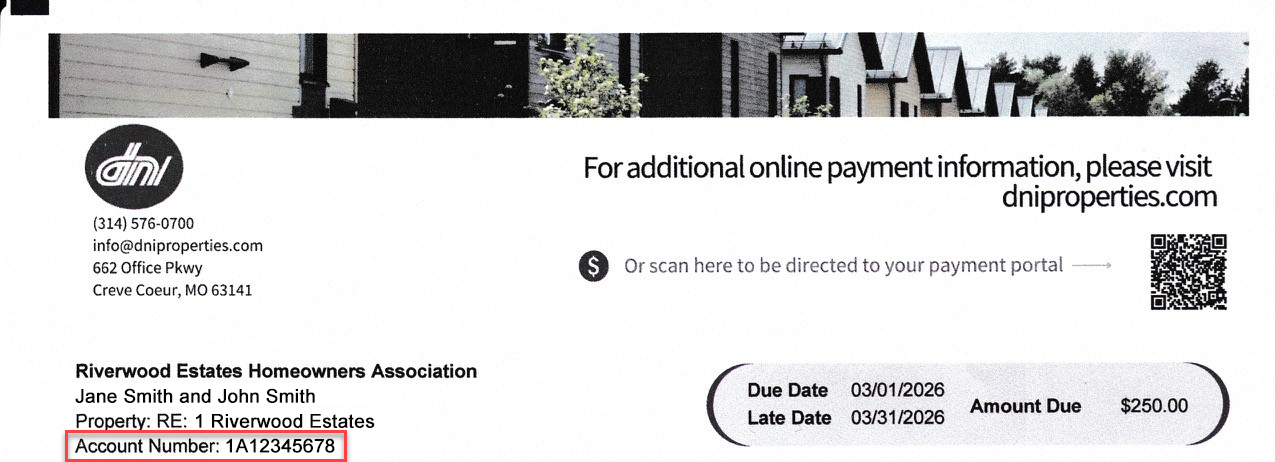
If you did not receive a bill or lost the bill, you can contact our DNI Properties representative to retrieve your DNI Properties account number one of two ways:
Phone Call
Call DNI Properties @ 314-576-0700 ext. 407. Inform the rep that you are from Riverwood Estates and you would like to get your Account Number. You will need to provide the rep your full name and address. If the rep is not available, you can call using the number provided without the extension to contact a general rep to provide you the Account Number.Email
Email DNI Properties @ kbufe@dniproperties.com. Inform the rep you are from Riverwood Estates and you would like to get your Account Number. Provide your full name and address.
Step 2
There are multiple ways to pay your HOA dues for Riverwood Estates. As mentioned above, if you use the DNI Properties website or app, you will be charged an additional 4.95% convenience fee. The options below provide a less expensive way to pay your dues.
Mail: $0 Additional Cost
Paying HOA dues via mail has no additional cost. Follow the steps below on how to pay your HOA dues using the mailing method.
On the bottom of the bill for HOA dues you received from DNI Properties, tear the bottom third of the document that contains your account and
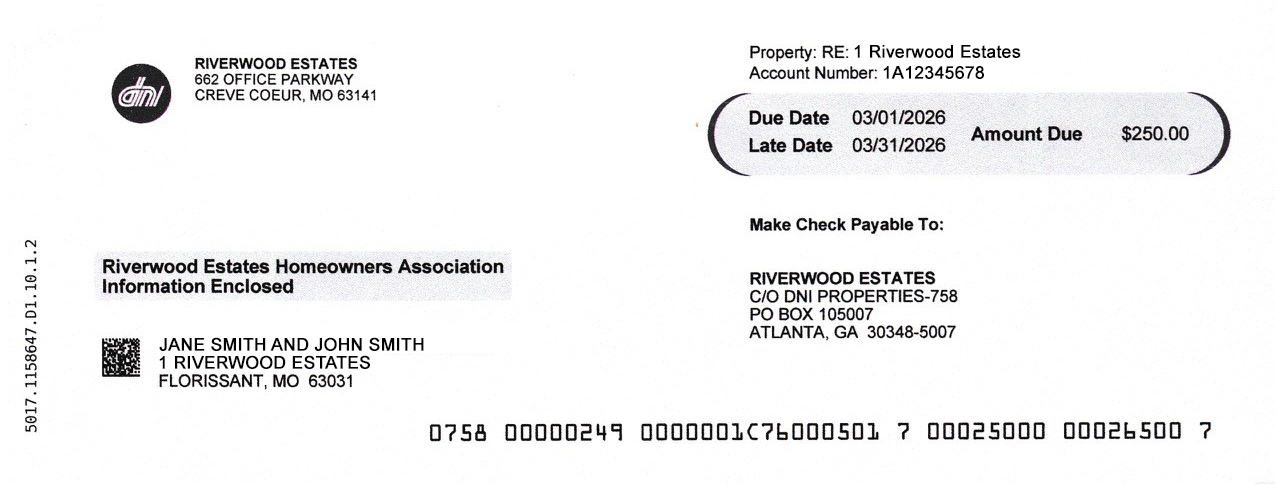
2. Insert the bottom third of the document in an envelope with your payment (cash or check).
NOTE: If paying by check, write the check out to Riverwood Estates.
3. Mail your payment to the following address:
Riverwood Estates
662 Office Parkway
Creve Coeur, MO 63141
Verification of payment can be confirmed via phone call to DNI Properties, website, or app.

Online - Checking/Savings Account: $0 Additional Cost
Paying HOA dues via Online – Checking/Savings Account has no additional cost. This method is cheaper because it is paying the bank directly, instead of a third-party app that adds an additional fee to their company. Follow the steps below on how to pay your HOA dues using the Online – Checking/Savings Account method.
Go to HOA Bank Services to make a payment.
https://www.hoabankservices.com/OnlinePaymentsSelect the Make a One-Time Payment button.
NOTE: You can create an account using your account information to set up recurring payments or to save your payments, but it is not necessary.In the Enter Name of Your HOA field, type in Riverwood Estates.
RESULT: A drop-down displays with similar search results.Select Riverwood Estates Home Owner’s Association.
Select the Continue button.
Select the Yes button to confirm your selection.
In the ID, Account, or Unit # field, enter your DNI Properties account number.
NOTE: Do not attempt to enter an ID # or Unit #, as that information does not pertain to our community.Select the Continue button.
Select the Check / Savings ($0 Fee per transaction) option.
Select the Continue button.
Enter the HOA dues amount.
Select the Continue button.
Enter your personal information in the fields on the screen.
Select the Continue button.
A pop-up displays for you to enter your account information. Select the account to pay from and then enter your account information.
Select the Continue button.
A summary of your payment displays. Review for accuracy.
Select the acknowledgement box to confirm accuracy.
Select the Pay button.
A confirmation and receipt is sent to your email and to DNI Properties. The payment process may take 1-2 business days.

Online - Credit/Debit Card: 2.95% Convenience Fee
Paying HOA dues via Online – Credit/Debit Card has an additional 2.95% convenience fee. This method is moderately cheaper than DNI Properties because it is paying the bank directly, instead of a third-party app that adds an additional fee to their company. Follow the steps below on how to pay your HOA dues using the Online – Credit/Debit Card method.
Go to HOA Bank Services to make a payment.
https://www.hoabankservices.com/OnlinePaymentsSelect the Make a One-Time Payment button.
NOTE: You can create an account using your account information to set up recurring payments or to save your payments, but it is not necessary.In the Enter Name of Your HOA field, type in Riverwood Estates.
RESULT: A drop-down displays with similar search results.Select Riverwood Estates Home Owner’s Association.
Select the Continue button.
Select the Yes button to confirm your selection.
In the ID, Account, or Unit # field, enter your DNI Properties account number.
NOTE: Do not attempt to enter an ID # or Unit #, as that information does not pertain to our community.Select the Continue button.
Select the Check / Savings ($0 Fee per transaction) option.
Select the Continue button.
Enter the HOA dues amount.
Select the Continue button.
Enter your personal information in the fields on the screen.
Select the Continue button.
A summary of your payment displays. Review for accuracy.
Select the acknowledgement box to confirm accuracy.
Select the Continue button.
Enter your credit/debit card information.
Select the Pay button.
A confirmation and receipt is sent to your email and to DNI Properties. The payment process may take 1-2 business days.